Finding a reliable obstacle avoiding robot kit helps kids and beginners learn coding, electronics, and robotics through hands-on play. The following five kits are well-suited for STEM learning, combine easy assembly with engaging features, and offer safe pathways into autonomous navigation. Each section highlights why it stands out and how it supports growing skills.
| Product | Brand | Key Benefit | Target Age |
|---|---|---|---|
| ELEGOO UNO R3 Smart Robot Car Kit | ELEGOO | Integrated obstacle avoidance and line tracking with smart control | 8-16 |
| Makeblock mBot Robot Kit | Makeblock | Scratch/Arduino learning with multiple programming paths | 8-12 |
| Sillbird Robot Building Kit (5-in-1) | Sillbird | Flexible 5-model set with Bluetooth/remote control | 8-13 |
| ELEGOO Conqueror Robot Tank Kit | ELEGOO | Tank-style chassis with rich Arduino-based learning | 8-16 |
| KEYESTUDIO Smart Car Robot | KEYESTUDIO | BLE app control and multiple modes including obstacle avoidance | 15+ |
ELEGOO UNO R3 Smart Robot Car Kit

The ELEGOO Smart Robot Car focuses on beginner programming, electronics assembly, and robotics fundamentals. It provides an integrated learning solution designed for education, enabling hands-on exploration of sensors, motors, and control logic. The kit is valued for its complete package of 24 module parts, which include obstacle avoidance and line tracing modules. It also supports control via phones and tablets on Android and iOS, broadening accessibility for home or classroom use. Assembly is streamlined thanks to standardized XH2.54 ports, reducing errors and speeding up the learning curve.
With obstacle avoidance, this kit helps young learners grasp sensor-based navigation early. The modular design encourages experimentation—students can swap modules to test different behaviors, such as line follow and remote control. The lack of complexity in setup makes it well-suited for solitary projects or guided classroom lessons. Students can gradually introduce coding commands to influence how the car reacts to impediments, improving logical thinking and problem-solving in a tangible way.
Makeblock mBot Robot Kit

The mBot kit targets learners who want a smooth bridge between Scratch-based coding and Arduino. It includes engaging tutorials and resources so kids progress from block-based programming to more advanced coding. Assembly is straightforward, generally completing in about 15 minutes, which keeps early learners motivated. Beyond the basics, mBot supports a remote control mode and obstacle avoidance, helping students observe how sensors detect environment and adjust behavior in real time. The platform’s wide ecosystem (apps and software) supports ongoing experimentation.
This kit is well-suited for guided lessons and independent projects alike. As students grow more confident, they can explore adding new components, expanding the robot’s capabilities, and tackling simple electronics concepts. The combination of Scratch-like interfaces and Arduino compatibility helps children build transferable skills, from sequencing to debugging, while preserving a low-friction entry point into robotics.
Sillbird 5-in-1 Robot Building Kit
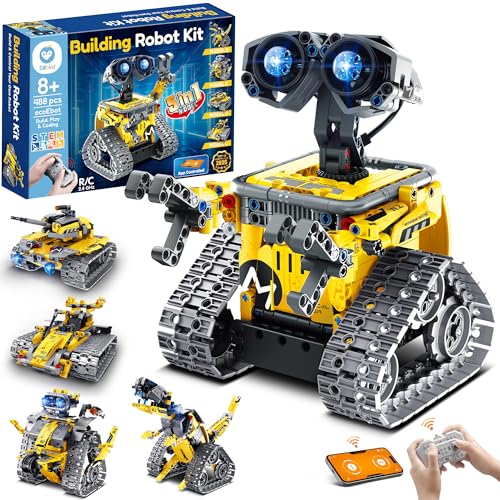
This 5-in-1 programmable robot set blends flexibility with educational value. It supports dual control modes, including a Bluetooth app and a remote, enabling learners to test programming concepts alongside direct manual control. The kit emphasizes STEM education by offering multiple models, encouraging kids to experiment with path planning, obstacle avoidance, and motion control. The app-integrated approach helps students visualize code outcomes and fosters iterative thinking as they refine algorithms for navigation and interaction with the environment.
With its expandable design, Sillbird grows with the user. As students gain confidence, they can deepen their understanding of programming logic, sensor fusion, and mechanical design. The kit’s versatility makes it suitable for diverse learning styles and pacing, whether for a classroom project or a family science night at home.
ELEGOO Conqueror Robot Tank Kit
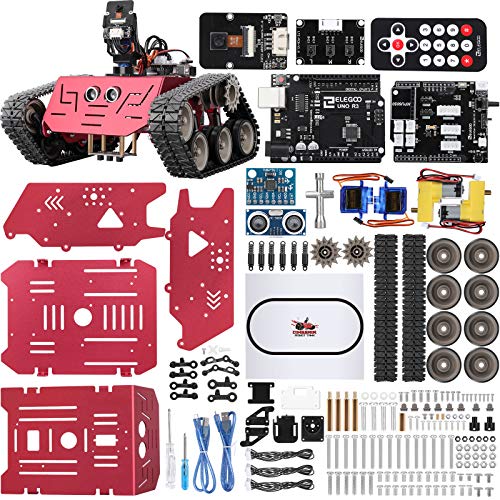
The Conqueror Tank Kit centers on Arduino-based learning with a rugged tank chassis that supports a broad range of experiments. It emphasizes open-source resources and rich learning materials, encouraging hands-on construction and problem solving. This kit is designed to cultivate concentration and practical skills as students assemble the car and explore its functions. Graphical programming options offer a visual method to construct and test robot behaviors, while the car’s features invite experimentation with sensors, motors, and control logic, helping learners connect software to hardware in meaningful ways.
Its modular design invites ongoing exploration, making it suitable for students who want to tilt toward more advanced robotics. The combination of hardware assembly, programming, and real-world application provides a balanced platform for developing technical confidence and curiosity about engineering challenges.
KEYESTUDIO Smart Car Robot

The KEYESTUDIO Smart Car Robot emphasizes hands-on programming from the start, with options for Android and iOS via the latest BLE tool. It includes IR control, auto-follow, obstacle avoidance, and line tracking modes, giving learners multiple ways to interact with the robot. The kit’s design showcases practical programming challenges that align with beginner-to-intermediate levels, supporting the development of logic, sequencing, and debugging skills. For older beginners and teens, the BLE app features offer a modern path to code-driven robotics while still providing tangible hardware interaction.
What sets KEYESTUDIO apart is its flexible control scheme and learning trajectory. Students can begin with basic movement and obstacle sensing, then expand into autonomous navigation and more complex behaviors as confidence grows. The kit also serves as a gateway to broader STEM topics, including electronics, sensors, and user interface considerations in robotics projects.
Buying Guide: Key Purchase Considerations
- Age and learning path: Choose kits that align with the learner’s age and preferred coding approach (Scratch, Arduino, Python). Early kits should emphasize safety and simplicity, while advanced sets can introduce more complex programming.
- Sensor and motor variety: Look for obstacle avoidance, line-following, infrared sensors, and multiple motor configurations. A broader sensor suite supports more dynamic experiments and real-world practice.
- Upgrade potential: Kits with modular parts or expandable components let students grow without buying a brand-new system. This is especially helpful for families or classrooms with varying skill levels.
- Programming ecosystem: A strong software suite (apps, tutorials, and community support) helps learners troubleshoot and stay engaged. Check for cross-platform compatibility (Android, iOS, Windows, macOS).
- Assembly and reliability: Easy-to-follow manuals, labeled ports, and standardized connectors reduce confusion during builds. Durable chassis and reliable wiring minimize frustration for beginners.
- Learning outcomes: Prefer kits that emphasize core STEM concepts—sensors, control theory, feedback loops, and safe experimentation. Look for projects that demonstrate cause-and-effect relationships.
- Safety and age-appropriateness: Ensure components are suitable for the target age, with small parts supervised use for younger children and clear safety guidelines in manuals.
- Maintenance and support: Consider warranty and access to replacement parts. A responsive customer support channel helps when parts wear or fail during learning.
In summary, the best obstacle avoiding robot kit for a beginner blends accessible assembly, clear programming paths, and a flexible set of sensors and controllers. For ongoing growth, choose kits that offer expandability, robust tutorials, and a transition path from block-based to text-based coding. Evaluating these factors helps educators and families select a kit that delivers consistent learning value and enjoyable, hands-on robotics exploration.