If you’re building or upgrading a home flight or racing cockpit, you want a setup that supports both flight and racing simulations with sturdy construction and flexible adjustment. This guide highlights five top options geared toward serious sim enthusiasts. Each selection is favored for stability, adaptability, and ease of use, whether you’re a casual flyer, a competitive racer, or a hybrid sim gamer.
| Product | Best For | Why It Stands Out |
|---|---|---|
| Marada Flight Racing Simulator Cockpit with Red Seat | Hybrid flight/racing sims | 5 interchangeable panels; strong 40mm tubes; multi-axis adjustability |
| Marada Universal Flight Simulation Cockpit with Racing Seat Wheel Stand | Wheel and stick setups | Single-column frame; broad compatibility; highly adjustable |
| Anman Pro Flight Racing Simulator Cockpit with Triple Monitor Stand | Large monitor rigs | Dual simulation modes; full adjustability; heavy-duty frame |
| Meza – Cockpit Simulator Panel Kit | Clean, organized cockpit panels | Pre-cut, LED lighting, multiple instrument mounting options |
| Marada Flight Sim Chair Stand | Flight chair with joystick access | Professional stability, adjustable seating, strong support |
Marada Flight Racing Simulator Cockpit With Red Seat

The Marada cockpit combines flight and racing capabilities in a single, adjustable frame. It supports five interchangeable mounting panels for flight gear, wheels, joysticks, keyboards, or a mouse, allowing quick transitions between flight and racing modes. The 40mm thickened square tubes and right-angle welds provide a sturdy, wobble-free base, while anti-slip pads help keep the setup stable on various floor types. Best for: buyers who want a versatile, all-in-one cockpit that’s easy to reconfigure for different sims. Limitation: assembly may require careful alignment to ensure seamless panel interchangeability.
Marada Universal Flight Simulation Cockpit With Racing Seat Wheel Stand

This cockpit emphasizes universal compatibility with major wheel brands and flight gear. Built around a single column and 40mm square tubing, it supports both flying and racing configurations and is designed to accommodate popular accessories, including Saitek Honeycomb, Thrustmaster, HOTAS Warthog, and Logitech options. Best for: users seeking a compact, adaptable frame that easily switches between flight sticks and racing wheels. Caution: ensure your preferred gear fits the available mounting range and clearance.
Anman Pro Flight Racing Simulator Cockpit With Triple Monitor Stand
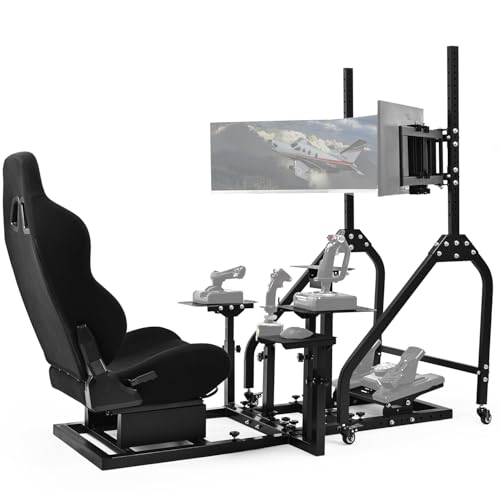
The Anman Pro model offers dual simulation modes with four reinforced mounting panels for wheels, joysticks, and control panels. Its 6-dimensional adjustment range supports users from about 1.4m to 2m tall, while a heavy-duty steel frame can tolerate high torque wheels. Best for: taller users or those needing a robust, mixed-use cockpit capable of supporting multiple monitors. Limitation: design emphasizes versatility over extremely compact footprints.
Meza – Cockpit Simulator Panel Kit

The Meza panel kit focuses on creating a clean, organized instrument layout. It supports Logitech yokes, throttle quadrants, and Honeycomb yokes, with LED ambient lighting for cockpit immersion. It also offers multiple instrument mounting positions, helping builders customize their cockpit’s interior. Best for: builders who want a modular panel base to organize flight instruments without a full-frame chassis. Caution: instrument panels and displays shown in pictures are not included, and mounting positions may require drilling or adjustments.
Marada Flight Sim Chair Stand Adjustable For Joystick

This chair stand integrates flight, air combat, and racing modes, featuring three large shift levers and compatibility with various accessories to expand play styles. It emphasizes a professional seating design with a center of gravity that helps prevent tipping, and a strong steel bracket with laser-welded construction. Best for: users who want a stable chair-based cockpit option that supports a wide range of peripherals. Limitation: maximum load and footprint may be larger than compact desk setups.
Thrustmaster T-Flight Full Kit HOTAS With Rudder Pedals

Though primarily known as a complete HOTAS system, this kit includes rudder pedals and a full throttle-and-stick configuration, designed for Xbox and PC. It provides an immersive, hands-on flight control experience across genres, with smooth pedal movement and integrated console compatibility. Best for: gamers seeking an authentic throttle-and-stick setup for flight sims and space combat. Caution: not a full cockpit frame on its own; requires a separate mounting or desk space.
Buying Guide: Key Considerations for a Full Cockpit Setup
- Intended use: Decide if you primarily fly, race, or blend both. Look for modular frames that support multiple modes without heavy reassembly.
- Frame material and stability: Prioritize steel or thick-walled aluminum frames with locking mechanisms and anti-slip feet to minimize wobble during aggressive maneuvers.
- Adjustability: Confirm range-of-motion for seat, pedals, wheel and yoke positions, and panel angles. Wider ranges reduce fatigue during long sessions.
- Compatibility: Check compatibility with your preferred brands (Logitech, Thrustmaster, Saitek, Honeycomb, etc.) and mounting options for wheels, yokes, and monitors.
- Space and footprint: Consider the footprint of the full setup, especially if you plan to place it in a multipurpose room or shared space.
- Upgrade path: Favor kits that allow incremental upgrades, such as adding a triple-monitor stand or expanding instrument panels later on.
Frequently Asked Questions
- What is the main benefit of a full cockpit vs. a desk setup?
- How much space is typically needed for a mid-sized cockpit?
- Are modular panels worth the extra cost for beginners?
- Can these cockpits support both flight yokes and racing wheels effectively?
- What is the best starting option for someone new to sim racing and flight?
- Do these products require professional installation or assembly?